 |
Hey Experimentalists! Some tasks are too big to tackle all at once. Our latest experimental feature is designed to help you break down overwhelming tasks into smaller, more manageable steps — so you can skip straight past analysis paralysis and start making progress. 💪 |
|
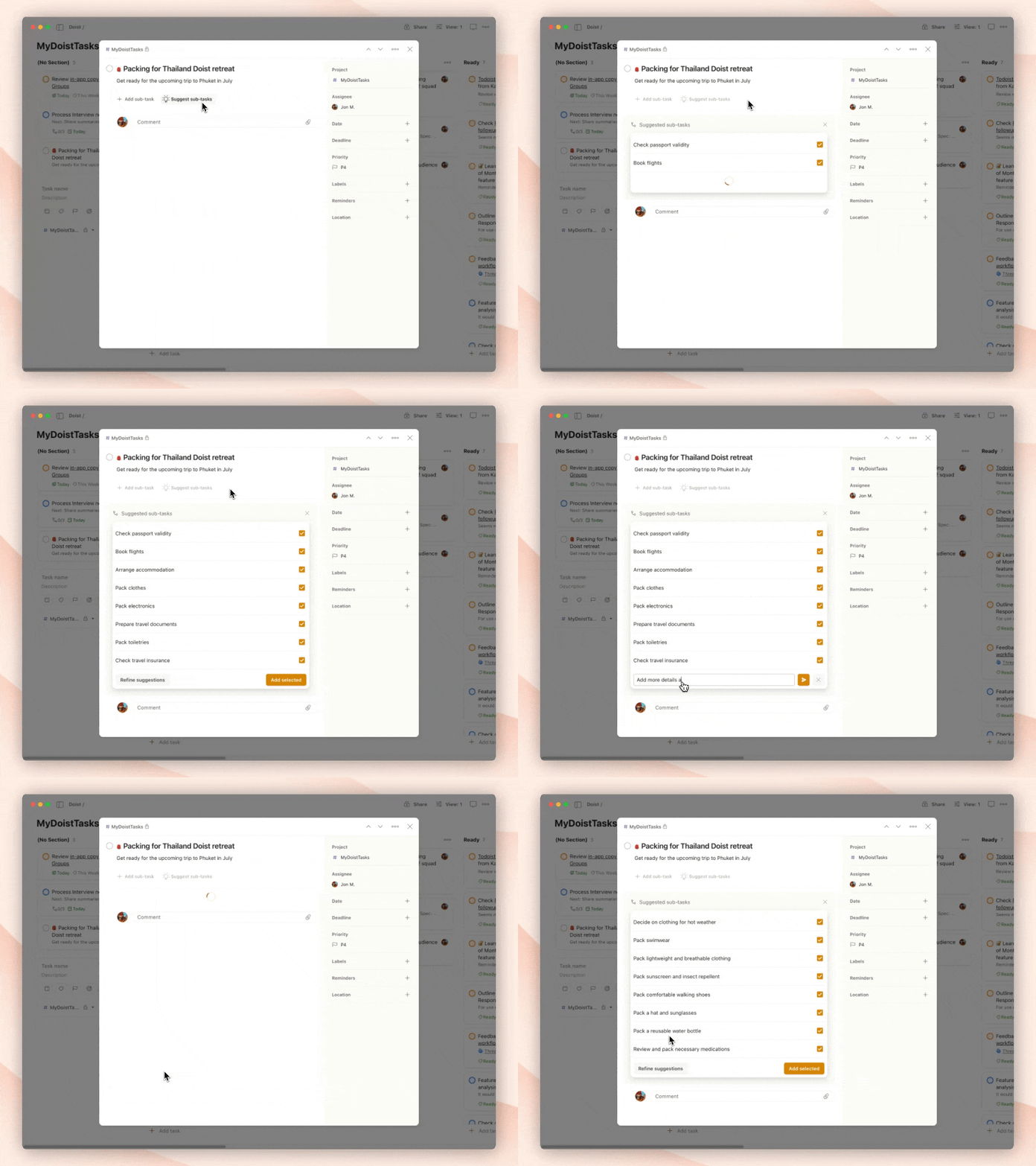
You’ll start seeing a new Suggest subtasks button right next to Add sub-task inside the task view. Click it, and Todoist will suggest subtasks based on the task title and any available context. From there, you can: Keep the ones that are useful, skip the ones that aren’t. Refine the suggestions by giving custom directions (like “Focus more on planning the trip itinerary”). Generate a fresh set of suggestions based on your input. ♻️
|
|
This feature is available to Pro users with beta features enabled. To try it out: Make sure you have Experimental Features enabled in your Todoist settings. Open a task that feels like it could use a little help getting started. Look for the lightbulb icon next to Add sub-task and click Suggest subtasks. Experiment with keeping, editing, or re-prompting suggestions.
|
|
Subtask suggestions is powered by Todoist Assist — the umbrella term we use for all of the AI-powered features in Todoist. We know trusting AI with your tasks (or with anything at all, honestly) isn’t a small thing. That’s why we’ve built Todoist Assist to run entirely on our own, secure infrastructure. Your data always stays private — it is never shared, never sold, and is never used to train any of the LLM models that Todoist Assist runs on. Curious how it works? Learn more about Todoist Assist.
|
|
We’d love to hear what you think! Your feedback helps us improve (and yes, we really do read it all). Subtask suggestions are live for all Experimentalists on Pro plans. Update to the latest version on web or desktop apps to give it a shot. If you find bugs and odd behaviors, or have requests for improvements, please submit them via the feedback form. That helps us immensely! Happy testing 🧪
|
|
Productively,  |
|
|